

After learning about this device (https://www.usbjtag.com/), it seemed promising as an option to be able to BDM these DMEs. Worked with the main dev on it for a little bit and got it working well. This device can also be used with the MSS54HP for those who have both cars (and with minimal modification to the XML files, can likely also work with the MSS52 / 54 non-HP).
One quirk of the program is it can't access both internal and external flash within the same session, so you need separate XML files. XMLs he helped me build in the code blocks below
Internal Flash
External Flash
I found speed 0 to be unstable. Initially i was using Speed 2, but found the external flash would hang on erase. Speed 1 seems to work reasonably reliably for me after some testing. YMMV based on connection quality, cable length, etc.
Regarding the censorship. This can be cleared by manipulating the registers. Clearing the censorship however will erase the entirety of the internal flash and shadow memory. So you must have a backup made via OBDII/CAN available to restore (i.e with MSS6x Flasher). It is not possible to backup the shadow memory - however it is known that the valid shadow memory for these ECUs would be the first 4 bytes set to '20 41 00 00' and the remainder to FF, so this is not an issue. Current version of MSS6x Flasher will save a full read in BDM format as well as the full binary to make this process a little easier.
Image attached with the commands to clear / set the censor bits. This can likely be packaged into the script, but it is not something you should have to run more than once per ECU.
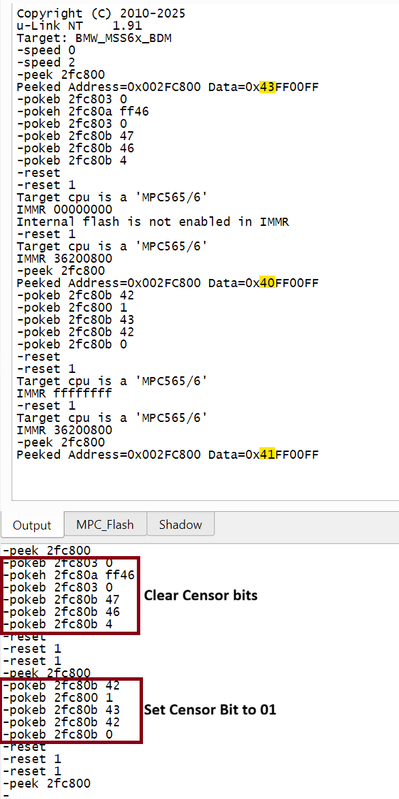
If you wish to place the ECU in censored mode, that can also be done using similar commands as above. However you must ensure that the IWS bit in the shadow block is set to 1 if you wish to retain the ability to clear the censor. If it is set to 0, it is not possible to clear the censor bits. From my testing with the MSS65 in this state, the ECU itself also appears to be rendered incapable of running its internal flash/erase routines -- effectively rendering it a brick if you have an incomplete program. I am not certain if that would be the case on the MSS60, and I don't intend to find out
One quirk of the program is it can't access both internal and external flash within the same session, so you need separate XML files. XMLs he helped me build in the code blocks below
Internal Flash
Code:
<Test>
<Name>BMW_MSS6x_Internal_Flash_BDM</Name>
<Protocol>BDMPPC</Protocol>
<Endian>Big</Endian>
<Speed>1</Speed>
<Cat>ECECM</Cat>
<SubProtocol>MPC55X</SubProtocol>
<sprogram>1</sprogram>
<InternalFlash>1</InternalFlash>
<Memorys>
<Memory>
<Name>MPC_Flash</Name>
<Type>1</Type>
<Address>0x0</Address>
<Size>0x80000</Size>
</Memory>
<Memory>
<Name>Shadow_block</Name>
<Type>1</Type>
<Address>0xF0000000</Address>
<Size>0x200</Size>
</Memory>
</Memorys>
<Inits>
<Init>
<Address>0x002FC000</Address>
<Value>0x70420C20</Value>
<Bytes>4</Bytes>
</Init>
<Init>
<Address>0x002FC024</Address>
<Value>0x00000000</Value>
<Bytes>4</Bytes>
</Init>
<Init>
<Address>0x002FC028</Address>
<Value>0x00000000</Value>
<Bytes>4</Bytes>
</Init>
<Init>
<Address>0x002FC02C</Address>
<Value>0x00000000</Value>
<Bytes>4</Bytes>
</Init>
<Init>
<Address>0x002FC030</Address>
<Value>0x00004A6C</Value>
<Bytes>4</Bytes>
</Init>
<Init>
<Address>0x002FC038</Address>
<Value>0x07008C00</Value>
<Bytes>4</Bytes>
</Init>
<Init>
<Address>0x002FC03C</Address>
<Value>0x02500000</Value>
<Bytes>4</Bytes>
</Init>
<Init>
<Address>0x002FC100</Address>
<Value>0x00C00863</Value>
<Bytes>4</Bytes>
</Init>
<Init>
<Address>0x002FC104</Address>
<Value>0xFFF80010</Value>
<Bytes>4</Bytes>
</Init>
<Init>
<Address>0x002FC108</Address>
<Value>0x00400043</Value>
<Bytes>4</Bytes>
</Init>
<Init>
<Address>0x002FC10C</Address>
<Value>0xFFE00040</Value>
<Bytes>4</Bytes>
</Init>
<Init>
<Address>0x002FC110</Address>
<Value>0x01600843</Value>
<Bytes>4</Bytes>
</Init>
<Init>
<Address>0x002FC114</Address>
<Value>0xFFEF8030</Value>
<Bytes>4</Bytes>
</Init>
<Init>
<Address>0x002FC118</Address>
<Value>0x01400847</Value>
<Bytes>4</Bytes>
</Init>
<Init>
<Address>0x002FC11C</Address>
<Value>0xFFEF8000</Value>
<Bytes>4</Bytes>
</Init>
<Init>
<Address>0x002FC140</Address>
<Value>0x1C000000</Value>
<Bytes>4</Bytes>
</Init>
<Init>
<Address>0x002FC144</Address>
<Value>0x7C000000</Value>
<Bytes>4</Bytes>
</Init>
</Inits>
</Test>
Code:
<Test>
<Name>BMW_MSS6x_Ext_BDM</Name>
<Cat>ECECM</Cat>
<Protocol>BDMPPC</Protocol>
<SubProtocol>MPC55X</SubProtocol>
<Speed>1</Speed>
<Endian>Big</Endian>
<Use32bit>1</Use32bit>
<Memorys>
<Memory>
<Name>Ext_Flash</Name>
<Type>1</Type>
<Address>0x400000</Address>
<Size>0x200000</Size>
</Memory>
</Memorys>
<Inits>
<Init>
<Address>0x002FC000</Address>
<Value>0x70420C20</Value>
<Bytes>4</Bytes>
</Init>
<Init>
<Address>0x002FC024</Address>
<Value>0x00000000</Value>
<Bytes>4</Bytes>
</Init>
<Init>
<Address>0x002FC028</Address>
<Value>0x00000000</Value>
<Bytes>4</Bytes>
</Init>
<Init>
<Address>0x002FC02C</Address>
<Value>0x00000000</Value>
<Bytes>4</Bytes>
</Init>
<Init>
<Address>0x002FC030</Address>
<Value>0x00004A6C</Value>
<Bytes>4</Bytes>
</Init>
<Init>
<Address>0x002FC038</Address>
<Value>0x07008C00</Value>
<Bytes>4</Bytes>
</Init>
<Init>
<Address>0x002FC03C</Address>
<Value>0x02500000</Value>
<Bytes>4</Bytes>
</Init>
<Init>
<Address>0x002FC100</Address>
<Value>0x00C00863</Value>
<Bytes>4</Bytes>
</Init>
<Init>
<Address>0x002FC104</Address>
<Value>0xFFF80010</Value>
<Bytes>4</Bytes>
</Init>
<Init>
<Address>0x002FC108</Address>
<Value>0x00400043</Value>
<Bytes>4</Bytes>
</Init>
<Init>
<Address>0x002FC10C</Address>
<Value>0xFFE00040</Value>
<Bytes>4</Bytes>
</Init>
<Init>
<Address>0x002FC110</Address>
<Value>0x01600843</Value>
<Bytes>4</Bytes>
</Init>
<Init>
<Address>0x002FC114</Address>
<Value>0xFFEF8030</Value>
<Bytes>4</Bytes>
</Init>
<Init>
<Address>0x002FC118</Address>
<Value>0x01400847</Value>
<Bytes>4</Bytes>
</Init>
<Init>
<Address>0x002FC11C</Address>
<Value>0xFFEF8000</Value>
<Bytes>4</Bytes>
</Init>
<Init>
<Address>0x002FC140</Address>
<Value>0x1C000000</Value>
<Bytes>4</Bytes>
</Init>
<Init>
<Address>0x002FC144</Address>
<Value>0x7C000000</Value>
<Bytes>4</Bytes>
</Init>
</Inits>
</Test>
Regarding the censorship. This can be cleared by manipulating the registers. Clearing the censorship however will erase the entirety of the internal flash and shadow memory. So you must have a backup made via OBDII/CAN available to restore (i.e with MSS6x Flasher). It is not possible to backup the shadow memory - however it is known that the valid shadow memory for these ECUs would be the first 4 bytes set to '20 41 00 00' and the remainder to FF, so this is not an issue. Current version of MSS6x Flasher will save a full read in BDM format as well as the full binary to make this process a little easier.
Image attached with the commands to clear / set the censor bits. This can likely be packaged into the script, but it is not something you should have to run more than once per ECU.
If you wish to place the ECU in censored mode, that can also be done using similar commands as above. However you must ensure that the IWS bit in the shadow block is set to 1 if you wish to retain the ability to clear the censor. If it is set to 0, it is not possible to clear the censor bits. From my testing with the MSS65 in this state, the ECU itself also appears to be rendered incapable of running its internal flash/erase routines -- effectively rendering it a brick if you have an incomplete program. I am not certain if that would be the case on the MSS60, and I don't intend to find out
Comment