Announcement

Collapse
No announcement yet.

What to Select (INPA) for the U.S. M3?

Collapse
X
 
  • Filter
  • Time
  • Show
Clear All
new posts

    What to Select (INPA) for the U.S. M3?

    All this while, I had been selecting MS S50 for S50 M3; however, that seems to be the Euro M3...so, which one for the U.S. M3...(see screen shot)?


    #2
    MS41.1 for OBD2

    MS40.1 for OBD1 (whichever M50 option works, I don't own an OBD1 car)


    US M3 are pumped up M52 and M50 engines. There is no special place for us on that list.

    Comment


      #3
      Originally posted by Braymond141
      MS41.1 for OBD2

      MS40.1 for OBD1 (whichever M50 option works, I don't own an OBD1 car)


      US M3 are pumped up M52 and M50 engines. There is no special place for us on that list.
      Cool Braymond...thanks!

      Comment


        #4
        All this time? You must have found out quickly that doesn't do anything. Like after the first try.

        When in doubt, just try all untill it connects to the module/engine you're trying to communicate with.

        Comment


          #5
          Originally posted by M_Parallel
          All this time? You must have found out quickly that doesn't do anything. Like after the first try.

          When in doubt, just try all untill it connects to the module/engine you're trying to communicate with.
          Actually, I thought I had to upgrade drivers (FTDI) then trying to understand why the BMW driver wasn't showing up under the COM ports in Windows 7. So, I would get headache dealing with Windows platform (Mac person) and give up. Then, I read INPA requires COM1...and to get older cars is shift F9.


          So, I selected MS S50 for S50 M3 and got failure to connect...until I realize I was trying to pull up the Euro M3...looking back now I had to laugh.

          Comment


            #6
            You can change the Inpa menu to have the E36 on the main menu.

            Comment


              #7
              Originally posted by M_Parallel
              You can change the Inpa menu to have the E36 on the main menu.
              Interesting M_Parallel...how do I do that?

              Comment


                #8
                Okay, I tried DME 3.3.1 for M50 2.5.1 as well as MS 40.1 for M50 2.0.1 got...see screen shot. I checked INPA/CGDAT folder, and I have DME331.ini, DME331.IPO as well as MS401.ini, MS401.IPO. How do add the missing files and where I'll get them.


                Comment


                  #9
                  Are you sure you have a good cable? There are a lot of poor ones that don't have all the connections you need. You're going through the 20 pin under the hood right?


                  Sent from my SM-N910V using Tapatalk

                  Comment


                    #10
                    Originally posted by vmbray
                    Are you sure you have a good cable? There are a lot of poor ones that don't have all the connections you need. You're going through the 20 pin under the hood right?


                    Sent from my SM-N910V using Tapatalk
                    On a 95 he shouldn't have any other port to go through, no?


                    Agreed on the cable though. The quality doesn't matter in most cases. Sometimes you have to get in there and modify the connected pins. I use a USB to OBD2 "INPA" cable and then I split the case open to solder in a 20-pin connector lead that hangs off the side. They make OBD2 to 20-pin adapters too, but I didn't have one at the time.


                    Post a pic of you cable Nolli.

                    Comment


                      #11
                      Originally posted by Braymond141
                      On a 95 he shouldn't have any other port to go through, no?


                      Agreed on the cable though. The quality doesn't matter in most cases. Sometimes you have to get in there and modify the connected pins. I use a USB to OBD2 "INPA" cable and then I split the case open to solder in a 20-pin connector lead that hangs off the side. They make OBD2 to 20-pin adapters too, but I didn't have one at the time.


                      Post a pic of you cable Nolli.
                      Well good point about no obd2 port. I bought a cable that works but I had to look around. It's a pain to solder and add pins but of course can be done. I've got one of those frankencables too


                      Sent from my SM-N910V using Tapatalk

                      Comment


                        #12
                        Originally posted by NolliM3
                        Interesting M_Parallel...how do I do that?
                        Don't have my laptop here, but there is an .ini or .cfg file that has the menu listed.


                        You simply set F2=E36 in the text.


                        It's self-explanatory once you see it.

                        Comment


                          #13
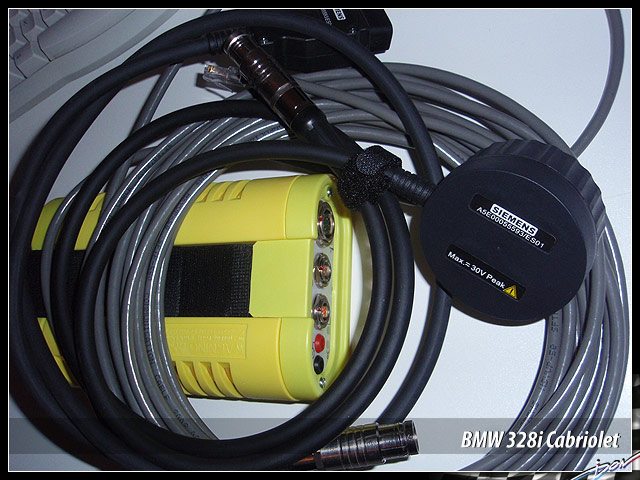
                          Here's the cable as well as the file in EDIABAS/ECU...this folder also has the .grp files too...so how do I get INPA to see. It seems that I can access other modules such as EWS...that suggest INPA/cable working together.


                          Comment


                            #14
                            Originally posted by M_Parallel
                            Don't have my laptop here, but there is an .ini or .cfg file that has the menu listed.


                            You simply set F2=E36 in the text.


                            It's self-explanatory once you see it.
                            Cool M_Parallel...thanks!

                            Comment


                              #15
                              Don't you need a K+L line?


                              I stopped bothering with cables and need for a serial ported laptop.


                              Comment

                              Working...
                              X