Announcement

Collapse
No announcement yet.

heinzboehmer's 2002 Topaz 6MT Coupe

Collapse
X
 
  • Filter
  • Time
  • Show
Clear All
new posts

  • heinzboehmer
    replied
    Aaand done!

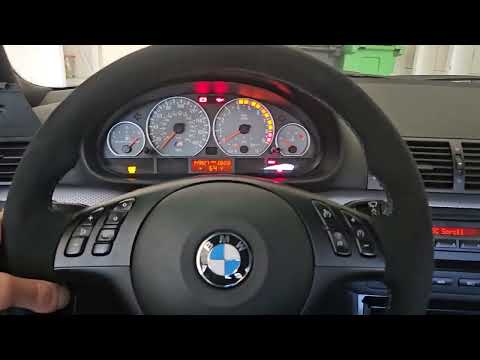
    Excuse the terrible everything. The majority of my focus was going into not crashing. Nice videography and smooth driving were very low on the priority list.
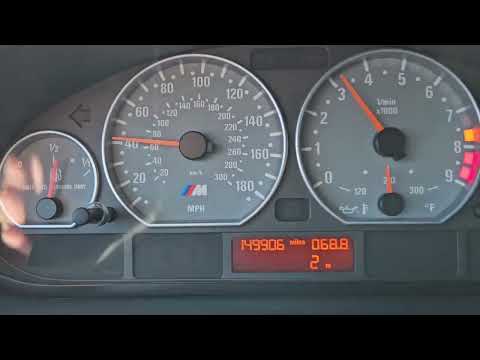


    You can see a few things in the video:
    1. The latency is a big one. Keep in mind that the gear won't update until the clutch is fully released, so street driving with feathering of the clutch towards the end of its travel will make it appear worse than it is. That said, it still is slow because of the 2 Hz refresh rate. I messed around with sending D bus messages at different frequencies and it seems like the IKE itself tops out at that same 2 Hz, so unfortunately, I'll just have to deal with it. I don't think it'll be a huge issue since I don't plan on staring at it during normal driving.
    2. "m" comes on as a money shift indicator! It essentially tells you if it's safe or not to downshift. However, I did find out that the low OBC will not update just the "m". If the value stays the same and you ask it to show/clear the "m", nothing will happen. You need to clear the display first, which is why you can sometimes see it flash back to the clock briefly. As a workaround, I added a separate mode with no money shift indicator that I can switch to if it turns out the flashing is too annoying.
    3. The buffered `0` gear works great. It's set to wait for 1.5s before displaying 0, which works out to be a very natural amount of time that elapses from clutch in to 0 vehicle speed, when coming to a stop. Also way more than enough time to perform a gear change. Very happy with this part of the implementation.
    Quick test drive was all I had time for on my lunch break. Will spend some time later cleaning up the code and upload to GitHub.

    Leave a comment:


  • heinzboehmer
    replied
    Originally posted by bigjae46 View Post

    The DME monitors the hall effect switch on the brake pedal to open/close the brake booster solenoid through the ECU. There is no required direct communication between the DME and MK60. IIRC, I only have one wire that runs directly between the ECU and MK60 which is blue with red stripe? You can't simply delete the hall effect switch and replace with an on/off switch...don't ask how I found this out.

    If you look at GSR Motorsports, you can tap into the brake pressure sensor wires and pull pressure data. This has been a game changer since I've been pulling the data. I have an AiM Solo 2 DL with an ACC CAN2 expansion.

    MK60 Brake Pressure Sensor Data – GSR Motorsports
    Yeah, this might have to be the route I go down.

    There are three things I want to log that are only accessible via DS2 (and thus off limits with this new relay feature):
    1. Throttle pedal position (not TPS, I want to see how my foot is messing up, not what the DME is telling the throttle bodies to do)
    2. Brake pressure front
    3. Brake pressure rear
    I can get (1) on CAN with modified DME FW.

    For (2) and (3), I can either keep trying to optimize the SW to deal with the multiple D bus commands gracefully or just give up and run a few wires from the pressure sensors to the ADCs on Gauge.S. The latter is sounding way more appealing at the moment. Should be super easy to calibrate based on the DS2 brake pressure data, as well.

    Leave a comment:


  • bigjae46
    replied
    Originally posted by karter16 View Post

    Unfortunately I'm pretty sure it doesn't. Anything where the DME needs to know the status of the brakes it's simply evaluating the brake light switch. I'd love to be proven wrong on this, but I haven't found any evidence of the pressure data being available in the DME (and I've specifically looked for it).
    The DME monitors the hall effect switch on the brake pedal to open/close the brake booster solenoid through the ECU. There is no required direct communication between the DME and MK60. IIRC, I only have one wire that runs directly between the ECU and MK60 which is blue with red stripe? You can't simply delete the hall effect switch and replace with an on/off switch...don't ask how I found this out.

    If you look at GSR Motorsports, you can tap into the brake pressure sensor wires and pull pressure data. This has been a game changer since I've been pulling the data. I have an AiM Solo 2 DL with an ACC CAN2 expansion.

    MK60 Brake Pressure Sensor Data – GSR Motorsports

    Leave a comment:


  • heinzboehmer
    replied
    Went for a drive, found a couple bugs in my Gauge.S config, fixed, logged.

    Here's what the BlueBus saw, with my comments added on the right:

    Code:
    [25095117] DEBUG: IBus: RX[7]: 3F 05 BB 01 04 B1 35  ->  1st gear,  1201 RPM
    [25095616] DEBUG: IBus: RX[7]: 3F 05 BB 01 04 D4 50  ->  1st gear,  1236 RPM
    [25096138] DEBUG: IBus: RX[7]: 3F 05 BB 01 04 F9 7D  ->  1st gear,  1273 RPM
    [25096653] DEBUG: IBus: RX[7]: 3F 05 BB 01 04 EC 68  ->  1st gear,  1260 RPM
    [25097668] DEBUG: IBus: RX[7]: 3F 05 BB 01 05 48 CD  ->  1st gear,  1352 RPM
    [25098177] DEBUG: IBus: RX[7]: 3F 05 BB 01 05 A3 26  ->  1st gear,  1443 RPM
    [25099204] DEBUG: IBus: RX[7]: 3F 05 BB 01 06 89 0F  ->  1st gear,  1673 RPM
    [25099712] DEBUG: IBus: RX[7]: 3F 05 BB 01 06 B1 37  ->  1st gear,  1713 RPM
    [25100239] DEBUG: IBus: RX[7]: 3F 05 BB 01 07 00 87  ->  1st gear,  1792 RPM
    [25100737] DEBUG: IBus: RX[7]: 3F 05 BB 01 07 74 F3  ->  1st gear,  1908 RPM
    [25101250] DEBUG: IBus: RX[7]: 3F 05 BB 01 09 3B B2  ->  1st gear,  2363 RPM
    [25101759] DEBUG: IBus: RX[7]: 3F 05 BB 01 0B 1F 94  ->  1st gear,  2847 RPM
    [25102268] DEBUG: IBus: RX[7]: 3F 05 BB 01 0D 27 AA  ->  1st gear,  3367 RPM
    [25102779] DEBUG: IBus: RX[7]: 3F 05 BB 00 0D FA 76  ->  Clutch in, 3578 RPM
    [25103285] DEBUG: IBus: RX[7]: 3F 05 BB 00 0A 59 D2  ->  Clutch in, 2649 RPM
    [25103810] DEBUG: IBus: RX[7]: 3F 05 BB 02 08 9C 17  ->  2nd gear,  2204 RPM
    [25104313] DEBUG: IBus: RX[7]: 3F 05 BB 02 09 EE 64  ->  2nd gear,  2542 RPM
    [25104825] DEBUG: IBus: RX[7]: 3F 05 BB 02 0A C0 49  ->  2nd gear,  2752 RPM
    [25105338] DEBUG: IBus: RX[7]: 3F 05 BB 02 0B CB 43  ->  2nd gear,  3019 RPM
    [25105848] DEBUG: IBus: RX[7]: 3F 05 BB 00 0A 6C E7  ->  Clutch in, 2668 RPM
    [25106370] DEBUG: IBus: RX[7]: 3F 05 BB 03 07 F3 76  ->  3rd gear,  2035 RPM
    [25106875] DEBUG: IBus: RX[7]: 3F 05 BB 03 08 6A E0  ->  3rd gear,  2154 RPM
    [25107388] DEBUG: IBus: RX[7]: 3F 05 BB 00 08 BE 37  ->  Clutch in, 2238 RPM
    [25107899] DEBUG: IBus: RX[7]: 3F 05 BB 00 05 F9 7D  ->  Clutch in, 1529 RPM
    [25108410] DEBUG: IBus: RX[7]: 3F 05 BB 00 06 DD 5A  ->  Clutch in, 1757 RPM
    [25108941] DEBUG: IBus: RX[7]: 3F 05 BB 00 08 18 91  ->  Clutch in, 2072 RPM
    [25109434] DEBUG: IBus: RX[7]: 3F 05 BB 00 07 DF 59  ->  Clutch in, 2015 RPM
    [25110959] DEBUG: IBus: RX[7]: 3F 05 BB 02 0B 4A C2  ->  2nd gear,  2890 RPM
    [25111470] DEBUG: IBus: RX[7]: 3F 05 BB 02 0B 63 EB  ->  2nd gear,  2915 RPM​
    Looks good to me!

    Note that since this is on the I bus side of things, the message is structured like so:

    Code:
    | Source | Length | Destination | Gear | RpmHi | RpmLo | Checksum |
    |   3F   |   05   |     BB      |  01  |  04   |  B1   |    35    |​
    Progress on the BlueBus side is steady, should be able to test that out soon.

    While driving, I got the idea to "buffer" the gear change in the cluster screen. Essentially, if a message with `gear == 0` arrives, we keep the previous gear on screen for the length of some timeout (thinking 1-2s) before displaying 0. If a message with `gear != 0` arrives before the timeout expires, we cancel the waiting and immediately display the new gear.

    I think this will make the user experience a little nicer, since the display won't be jumping around in between gear changes. The `Gear` param in Gauge.S is set up to send 0 on clutch in, so the jumping around is inevitable, unless something like the above is implemented.

    I'm pretty sure Porsche employs a similar strategy with their cluster gear display and those feel pretty natural, so will take a page out of their book.

    I've also decided to implement the "money shift" logic entirely in the BlueBus FW, since I don't feel like messing with Gauge.S anymore. This is why RPM is included in the message.

    And for posterity, here's the config I settled on for Gauge.S (the newer FW requires the `funData` section to be in `config.json`):

    Code:
    {
        "canSpeed": 500,
        "funData": [
            {
                // D bus to I bus relay
                "name": "d2i_relay",
                "frequency": 2, // Every 0.5 seconds, can't seem to get it to go faster
                // Don't forget to add more `0xFF` bytes as a pseudo-malloc if array grows.
                // d2i_relay[2] = Gear, d2i_relay[3] = RPM[8:15], d2i_relay[4] = RPM[0:7], d2i_relay[3] = Checksum.
                "values8": ["0xBB", "0x06", "0xFF", "0xFF", "0xFF", "0xFF"],
                "expr": [
                    "obtainKline('d2i_relay', 0x01)" // (0x00 - DS2 protocol) | (0x01 - arrayIndex 1)
                ]
            }
        ],
        "ecuparam": [
            // Params
    
            ...
    
            // Start D bus to I bus Relay Logic
            {
                "header": "SetD2IDataByte2",
                "expr": "setData('d2i_relay', 2, {Gear})",
                "hidden": true,
                "noLog": true
            },
            {
                "header": "RPMHighBits",
                // Mask bits 8-15 and shift
                "x": "RPM",
                "expr": "(x & 0xFF00) >> 8",
                "hidden": true,
                "noLog": true
            },
            {
                "header": "SetD2IDataByte3",
                "expr": "setData('d2i_relay', 3, {RPMHighBits})",
                "hidden": true,
                "noLog": true
            },
            {
                "header": "RPMLowBits",
                // Mask bits 0-7
                "x": "RPM",
                "expr": "x & 0xFF",
                "hidden": true,
                "noLog": true
            },
            {
                "header": "SetD2IDataByte4",
                "expr": "setData('d2i_relay', 4, {RPMLowBits})",
                "hidden": true,
                "noLog": true
            },
            {
                "header": "SetChecksum",
                // 189 (0xBD) is the precomputed XOR result of the first two static bytes of the d2i_relay message (0xBB ^ 0x06)
                "expr": "setData('d2i_relay', 5, (189 |^ {Gear} |^ {RPMHighBits} |^ {RPMLowBits}))",
                "hidden": true,
                "noLog": true
            }
            // End D bus to I bus Relay Logic.
        ]
    }

    Leave a comment:


  • heinzboehmer
    replied
    Originally posted by George Hill View Post
    Very interesting, that would be cool for sure!
    Yep! They're nice to have in datalogs. Here's how to request them, if you're interested: https://nam3forum.com/forums/forum/m...734#post266734

    Gauge.S can relay data over CAN too, so just a matter of setting it up for that and any standard CAN datalogger will have access to them.

    Leave a comment:


  • karter16
    replied
    Originally posted by George Hill View Post

    Very interesting, that would be cool for sure!

    Yeah that would certainly be harder. The MSS54 doesn't have any capability to make outbound DS2 queries. It only services sending the results of queries made to it.


    Sent from my iPhone using Tapatalk

    Leave a comment:


  • George Hill
    replied
    Originally posted by heinzboehmer View Post
    you can query it from the MK60 with a DS2 command.
    Very interesting, that would be cool for sure!


    Leave a comment:


  • heinzboehmer
    replied
    Originally posted by karter16 View Post
    Unfortunately I'm pretty sure it doesn't. Anything where the DME needs to know the status of the brakes it's simply evaluating the brake light switch. I'd love to be proven wrong on this, but I haven't found any evidence of the pressure data being available in the DME (and I've specifically looked for it).


    That's alright. Maybe it's time to splice into the sensors directly and stop worrying about relaying the data over multiple busses.

    Originally posted by George Hill View Post
    All of the track guys for years have been hoping to find brake pressures over the CAN bus, but no luck. AFAIK it isn't broadcast out of the DSC.
    Yeah unfortunately the data isn't on CAN, but you can query it from the MK60 with a DS2 command. If the DME knew these values, we could hack its FW up and have it send them out over CAN

    karter16 has a proof of concept of sending internal DME data out over CAN somewhere (couldn't find the thread in my five seconds of searching), but hacking it up to both query the MK60 and send out over CAN sounds much harder.

    Leave a comment:


  • George Hill
    replied
    All of the track guys for years have been hoping to find brake pressures over the CAN bus, but no luck. AFAIK it isn't broadcast out of the DSC.

    Leave a comment:


  • karter16
    replied
    Originally posted by heinzboehmer View Post
    karter16, any chance the DME has that data? If so, CAN relay in the DME seems like the simplest route.
    Unfortunately I'm pretty sure it doesn't. Anything where the DME needs to know the status of the brakes it's simply evaluating the brake light switch. I'd love to be proven wrong on this, but I haven't found any evidence of the pressure data being available in the DME (and I've specifically looked for it).

    Leave a comment:


  • heinzboehmer
    replied
    Sorek gave me FW that handles the XOR operator correctly, so now I can calculate the checksum without all that overhead.

    I also found that I can max out the message sending at ~2 Hz if I get rid of all my other D bus calls in the Gauge.S config. Ideally, I'd like it a little faster, but this will do. At least the frequency is pretty consistent this way.

    I'll figure out where to get brake pressures from later (this was my other D bus call). karter16, any chance the DME has that data? If so, CAN relay in the DME seems like the simplest route.

    Leave a comment:


  • heinzboehmer
    replied
    Also, success!

    Code:
    [104659] DEBUG: IBus: RX[5]: 3F 03 BB 04 83
    [105211] DEBUG: IBus: RX[5]: 3F 03 BB 44 C3
    [105895] DEBUG: IBus: RX[5]: 3F 03 BB 04 83
    [106455] DEBUG: IBus: RX[5]: 3F 03 BB 24 A3
    [107133] DEBUG: IBus: RX[5]: 3F 03 BB 04 83
    [108372] DEBUG: IBus: RX[5]: 3F 03 BB 84 03
    [112635] DEBUG: IBus: RX[5]: 3F 03 BB 84 03
    [118273] DEBUG: IBus: RX[5]: 3F 03 BB 44 C3
    [118862] DEBUG: IBus: RX[5]: 3F 03 BB 04 83
    [119506] DEBUG: IBus: RX[5]: 3F 03 BB 05 82
    [120745] DEBUG: IBus: RX[5]: 3F 03 BB 04 83
    I mapped the steering wheel cruise control buttons to a singular payload byte for Gauge.S to send out, then clicked on them randomly. The log above is (a parsed down version) of what the BlueBus's I bus logger prints out. You can see the fourth byte react to the button presses and the checksum get updated accordingly. Just a proof of concept, but it does show the full CAN -> Gauge.S -> D bus -> IKE -> I bus -> BlueBus route working correctly.

    Worth mentioning that the functionality that the Gauge.S FW has for sending out D bus messages is completely undocumented. The amount of blind guessing and testing I had to do to get this to work was not fun, to say the least.

    I also found a few bugs along the way. Most of them were related to JSON parsing (e.g. `^` gets parsed as the exponent operator instead of the XOR operator, so calculating the checksum involves a crazy workaround), but I got there in the end.

    The resulting config is convoluted, hard to read, inefficient and just in general pretty ugly. BUT, it does work! It gets nowhere near the 2 Hz send frequency specified, but at least I can continue the BlueBus development with this. Config follows, for posterity.

    fundata.json:
    Code:
    {
      "funData": [
        {
          // D bus to I bus relay
          "name": "d2i_relay",
          "frequency": 2, // Every 0.5 seconds, can't seem to get it to go faster
          // Don't forget to add more `0xFF` bytes as a pseudo-malloc if array grows.
          // d2i_relay[2] = Gear, d2i_relay[3] = RPM[4:7], d2i_relay[4] = RPM[0:3], d2i_relay[3] = Checksum.
          "values8": ["0xBB", "0x06", "0xFF", "0xFF", "0xFF", "0xFF"],
          "expr": [
            "obtainKline('d2i_relay', 0x01)" // DS2 protocol, arrayIndex 1
          ]
        }
      ]
    }​
    config.json:
    Code:
    {
        "interDelay": 50,
        "canSpeed": 500,
        "address": ["0xB8", "0x29", "0xF1", "0x02", "0x21", "0x06", "0x45"], // For requesting brake pressure from MK60 over D Bus
        "forceKwp": true, // For requesting brake pressure from MK60 over D Bus
        "ecuparam": [
    
            ...
            
            // Start D bus to I bus Relay Logic
            {
                "header": "SetD2IDataByte2",
                "expr": "setData('d2i_relay', 2, {Gear})",
                "hidden": true,
                "noLog": true
            },
            {
                "header": "XorD2IDataByte2",
                // 189 (0xBD) is the precomputed XOR result of the first two static bytes of the d2i_relay message (0xBB ^ 0x06)
                // `expr` is equivalent to d2i_relay[0] ^ d2i_relay[1] ^ d2i_relay[2]
                // Use A ^ B = (A & ~B) | (~A & B) since XOR operator is not supported
                "expr": "(189 & (255 - {Gear})) | ((255 - 189) & {Gear})",
                "hidden": true,
                "noLog": true
            },
            {
                "header": "RPMHighBits",
                // Mask bits 4-7 (& 0xF0) and shift
                "x": "RPM",
                "expr": "(x & 240) >> 4",
                "hidden": true,
                "noLog": true
            },
            {
                "header": "SetD2IDataByte3",
                "expr": "setData('d2i_relay', 3, {RPMHighBits})",
                "hidden": true,
                "noLog": true
            },
            {
                "header": "XorD2IDataByte3",
                // `expr` is equivalent to d2i_relay[0] ^ d2i_relay[1] ^ d2i_relay[2] ^ d2i_relay[3]
                // Use A ^ B = (A & ~B) | (~A & B) since XOR operator is not supported
                "expr": "({XorD2IDataByte2} & (255 - {RPMHighBits})) | ((255 - {XorD2IDataByte2}) & {RPMHighBits})",
                "hidden": true,
                "noLog": true
            },
            {
                "header": "RPMLowBits",
                // Mask bits 0-3 (& 0x0F)
                "x": "RPM",
                "expr": "x & 15",
                "hidden": true,
                "noLog": true
            },
            {
                "header": "SetD2IDataByte4",
                "expr": "setData('d2i_relay', 4, {RPMLowBits})",
                "hidden": true,
                "noLog": true
            },
            {
                "header": "XorD2IDataByte4",
                // `expr` is equivalent to d2i_relay[0] ^ d2i_relay[1] ^ d2i_relay[2] ^ d2i_relay[3] ^ d2i_relay[4]
                // Use A ^ B = (A & ~B) | (~A & B) since XOR operator is not supported
                "expr": "({XorD2IDataByte3} & (255 - {RPMLowBits})) | ((255 - {XorD2IDataByte3}) & {RPMLowBits})",
                "hidden": true,
                "noLog": true
            },
            {
                "header": "SetChecksum",
                "expr": "setData('d2i_relay', 5, {XorD2IDataByte4})",
                "hidden": true,
                "noLog": true
            }
            // End D bus to I bus Relay Logic.
        ]
    }​​
    This is the only valid approach I found, and unless Sorek adds functionality for sending out arbitrary D bus messages, this is how this is staying. If I could choose, I would structure a function that can be called inside `config.json` as follows and does the checksum calculation internally:
    Code:
    sendKline(Gear, RPMHighBits, RPMLowBits)
    Should free up some RAM and cut down on the number of cycles needed to prepare the message.

    Oh well, this is good enough for now. Time to go back to the C++ comfort zone with the rest of the BlueBus implementation.

    Leave a comment:


  • heinzboehmer
    replied
    Originally posted by George Hill View Post
    Just pulled it out doing some other work, no degradation or any issues observed. It probably won't go back in, but I'm going to put it in another car.


    Nice! Adds more credibility to the theory that the firewall doesn't actually get all that hot

    Leave a comment:


  • George Hill
    replied
    Originally posted by George Hill View Post

    Just pulled it out doing some other work, no degradation or any issues observed. It probably won't go back in, but I'm going to put it in another car.


    Leave a comment:


  • heinzboehmer
    replied
    Sat down and finished up the BlueBus side of the extended OBC project. I've yet to fully figure out the Gauge.S side of things, so am using dummy data for now. Will upload the BlueBus changes to GitHub once the data is real.

    Quick demo:


    Some things to note:
    • The "R/T" steering wheel button is used to put the extended OBC in scroll mode. This allows you to select what data is shown in the extra OBC page.
    • For convenience, the BlueBus uses the CD53 display to show when you're in extended OBC scroll mode and what page you've selected.
    • The cluster handles the extra page natively. That is, you can set up the data that you want to show and then scroll away from it using the "BC" button. If you want it shown again, just scroll to it with the same button.
    • You can update the data on the extra page without causing the cluster to jump to it. This means the page refresh handler can keep writing to it (or even scroll to a different page) in the background. This saves a lot of overhead in the BlueBus FW, since it doesn't have to worry about what page is being actively displayed in the cluster.
    • This is not shown in the video, but the feature is configurable in the BlueBus settings. You can fully turn it off and both the BlueBus and cluster will behave like they normally do.

    Leave a comment:

Working...
X